 NextMars
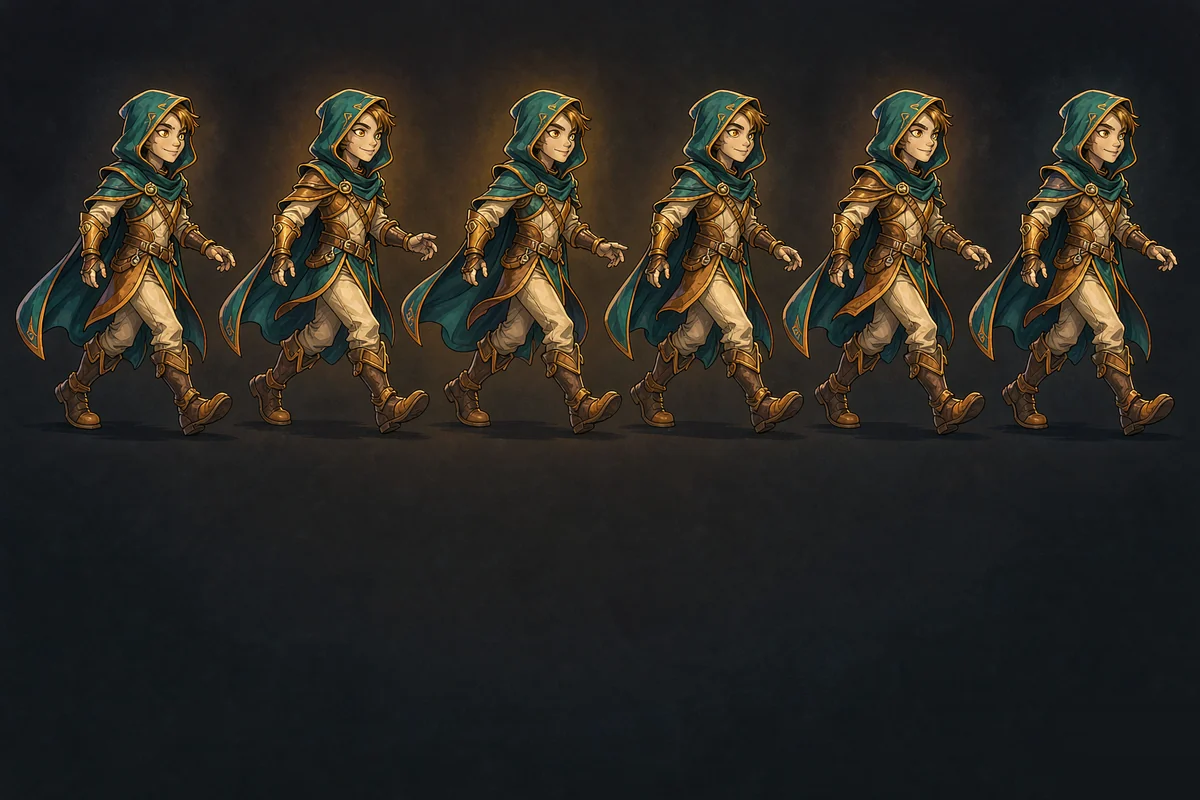
A sprite sheet is a single image file that contains every frame of a 2D animation on a regular grid; the engine crops each cell at runtime and plays the frames in order. It remains the most reliable way to ship character, prop and effect animation because one texture replaces a folder of loose PNGs and gives the engine a predictable address for every frame.
The difficult part is not the drawing. It is the small decisions around it — cell size, transparent gutter, anchor point, naming — that decide whether the animation drops into the engine cleanly or comes back as a jitter bug two sprints later.
NextMars is a 2D art studio working from London on concept art, characters, environments, UI, Spine and frame-by-frame animation. We build sheets for mobile, PC and console projects. The rules below are the ones our artists actually use, not a generic definition of the format.
What belongs on one sheet, and what does not
A sheet should hold frames that share three things: the same pixel scale, the same pivot logic, and the same treatment of edges and outlines.
Idle, walk and attack for one character belong together. A heavier weapon, a different outline weight or a glow effect drawn at a different scale does not — it belongs on a separate sheet even though it is the same character. The engine treats the file as one texture and samples cells by coordinate, so anything that changes the character's effective size changes the framing, and anything that changes the pivot changes the point it rotates from. Mixing those forces every consumer of the file to special-case it.
Our working rule is one sheet per character per state group, with effects on their own sheets. If a character has a mount or a second weapon silhouette, that is a new sheet, not a new row.
How much padding does a sprite sheet need?
Padding is the transparent gutter between cells. It exists for one mechanical reason: when the engine samples a cell with filtering or generates mipmaps, it reads a few pixels beyond the cell boundary. If the neighbouring frame sits right against the edge, its pixels bleed into yours.
There is no universal number, but our working default is a two-pixel transparent gutter around each frame, increased when edges are soft or when the sheet will be scaled down for mipmaps. That default is a habit from production, not a law of nature — the correct value is the one your import settings can tolerate.
| Decision | Working default | Why it matters |
|---|---|---|
| Cell size | The largest frame's bounds plus gutter, rounded to a whole pixel | A fractional cell shifts frames by a pixel on import |
| Gutter | Two transparent pixels between frames, more for soft edges | Stops filtering bleed from the neighbouring frame |
| Border | Transparent on all sides, no opaque frame | An opaque border shows as a rectangle at the seams |
| Scale | Identical pixel scale across all frames | A scale change reads as a size change in the game |
| Trim | Keep the full cell unless the pipeline requires trimmed sprites | Trimming without metadata moves the pivot |
The table is a starting point. What matters is that the choice is written down once and applied to every sheet in the project, so that frame twelve behaves like frame one.
Where do pivots and anchors go?
The pivot is the point the engine treats as the frame's origin. For a grounded character it should sit at a consistent place relative to the body — commonly the feet — and it must occupy the same logical spot on every frame. If the artist places it under the heel in one frame and under the toe in the next, the character will visibly slide while animating, even though the drawings themselves are right.
For airborne or rotating characters, the pivot usually belongs near the centre of mass rather than the feet. Either choice is fine. What is not fine is letting it drift. We mark the pivot on the reference frame first and copy it to the rest of the sheet before animation starts.
Anchor drift is one of the few bugs that looks like bad animation but is actually a file problem. It is worth checking in the sheet, before export, by flipping rapidly between two adjacent frames.
How should frames be ordered and named?
Order frames left to right, top to bottom, and do not rely on visual order alone. A sheet that a human reads as "the walking row" is meaningless to an importer that expects a fixed index.
Name the file for the character and the state, and keep a plain-text manifest beside it listing frame order, frame count and any states that share the sheet. The manifest does not need to be elaborate; its job is to answer what frame nine is supposed to be six months later, when the original artist is on another project.
If your engine supports sprite slices with named metadata, use them. If it does not, the manifest is the only record you have.
When is an atlas better than one sheet?
A single sheet is easy to open, easy to review and easy to hand over. An atlas packs several sheets into one larger texture, which reduces texture swaps when a scene contains many characters or effects.
The trade-off is legibility. An atlas is harder for a person to inspect, and a mistake in one character's frames is easier to miss. We use atlases when the project has a defined build pipeline and someone who owns the packing tool; otherwise we ship separate sheets, because a slightly higher texture count is cheaper than a silent error in the art.
For small teams, this is usually a decision about who owns the pipeline, not about performance.
What breaks on engine import?
Almost every sprite problem we are asked to fix falls into one of six buckets:
- Filtering bleed — neighbouring frames appear as a faint edge; padding was too small.
- Pivot drift — the character slides between frames; anchors were placed by eye per frame.
- Trim without metadata — the engine cropped to content and lost the original offset.
- Colour-space mismatch — the sheet was exported in one space and imported in another, shifting every colour.
- Alpha halos — a pale rim around edges, usually from premultiplied alpha being applied twice.
- Cell-size mismatch — the importer's grid does not match the artist's grid, so every frame is off by a few pixels.
None of these are drawing defects. All of them are caught by opening the exported file in the actual engine on day one, rather than at the end of the batch. That is why we ask for the import settings before we draw the first frame.
How do you brief a sprite sheet?
Four things are enough to start: the character and its state list, the frame count per state, the cell size and pivot rule, and the engine plus its import settings. A reference image helps, but it does not replace those four lines.
If your states are not settled yet, say so in the brief. A sheet built before the state list is stable will be rebuilt, and that is the most avoidable cost in 2D production. The alternative is to start with a single pilot animation and sign off the export settings on it before committing to the full set. Our guide to choosing a studio explains why a paid pilot is worth more than a long portfolio review, and what moves a quote explains why the export rules matter before anyone gives you a number.
How we work
We build sheets by hand, keep the source layered files, and deliver the exported sheet with a manifest and the pivot rule written down. If the project uses Spine instead, we deliver the project file as well as the atlas — see our production services for what that covers.
Send us those four lines and we will come back with a scope, a price and a date within 48 hours. If you are not ready to write a brief yet, read how to choose a game art outsourcing studio first; it is the shorter version of the same decision.